To access the configuration: Click on the setting gear icon on the top right, then click Settings, and then select Defaults on the left panel. On the right, you will see Invoice Search:
When connected to your MIS, you can make the search for the shipping data semi automatic or manual. First, you would type in the invoice/order number in the "Scanner Input..." field. Here is what the configuration means.
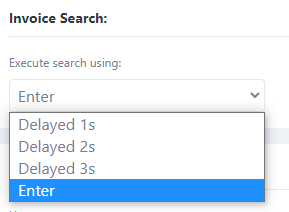
Delayed 1s to 3s - The system will start searching for an invoice automatically after waiting 1, 2, or 3 seconds.
Enter: The system will not start searching for the shipping data until you hit enter.
MAKE SURE YOU CLOSE AND RE-OPEN THE APP AFTER YOU MAKE ANY CHANGES.
Was this article helpful?
That’s Great!
Thank you for your feedback
Sorry! We couldn't be helpful
Thank you for your feedback
Feedback sent
We appreciate your effort and will try to fix the article