ShipLeap Momentum does validation checks on addresses entered into the app. This information is validated against the USPS database. Here is a what each icon means

An orange "i" means that the address is correct but something is missing to make the address complete. Typically, the issue is that a suite number is missing. You can hover over the order "i" to see the exact issue.
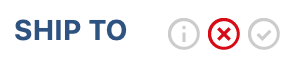 A red "x" means that the address was not found in the USPS database.
A green check means that the address was found in the USPS database. The address is ok to use.
Was this article helpful?
That’s Great!
Thank you for your feedback
Sorry! We couldn't be helpful
Thank you for your feedback
Feedback sent
We appreciate your effort and will try to fix the article