This article is for PC computers.
There isn't an automatic way to do this but it can be done by doing the following:
All address info is saved in a file that you will just have to copy from computer 1 to computer 2.
1. Type in %appdata% in the search window in Windows.

2. When the file folder pops up, click on shipleap
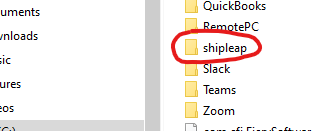
3. Locate a file called addressbook.db
This file contains all your address info. Copy this file somewhere so that you can then copy it to the same folder (follow steps 1 and 2) on computer #2. You will just need to drop the file in the shipleap folder on computer #2.
4. Close and re-open the app on the computer #2 and it should work.
Was this article helpful?
That’s Great!
Thank you for your feedback
Sorry! We couldn't be helpful
Thank you for your feedback
Feedback sent
We appreciate your effort and will try to fix the article